Command timeline and persistent sailing
A persistent sailing game needs more than immediate controls. If the boat keeps moving while the player is away, the player needs a way to plan future decisions before closing the game.
The design problem
Portbound Seas is lightweight and persistent by design. The boat keeps moving on realistic timelines, using real elapsed time rather than short arcade-style turns. That creates a specific design problem: the player may need the boat to turn, trim, reef, or anchor later, not right now.
In a typical sailing game, the answer would be simple: stay online and press the button at the right moment. For Portbound Seas, that would fight the entire premise. If the boat continues while the player is away, the player needs a way to issue future orders before stepping away.
The command timeline idea
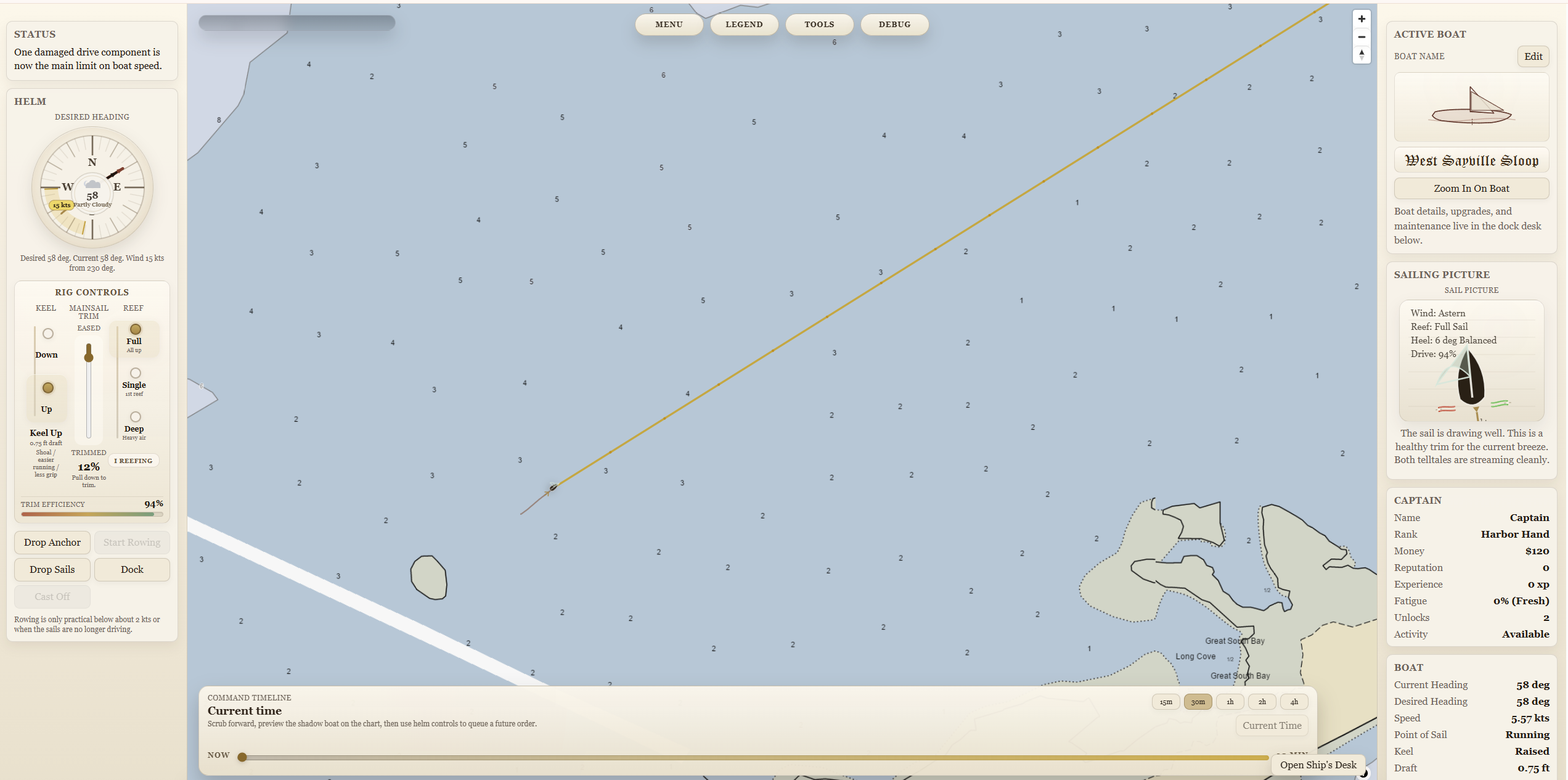
The command timeline is a wide bar at the bottom of the map. The left side represents current time. The player can scrub forward to a future point, see a ghost version of the boat at that future time, and then set an order while the timeline is focused on that future moment.
For example, a player sailing at 100 degrees could scrub forward thirty minutes, see where the boat is expected to be, and then set a future course change to 180 degrees. The live boat does not turn immediately. Instead, the order appears on the timeline and executes when that future time arrives.
Why this is not autopilot
This system is not intended to be a perfect route solver. It is closer to writing sailing orders. It should let the player plan ahead, but the player still owns the plan.
That distinction matters. If the player ignores weather, wind direction, depth, timing, or boat handling, the scheduled command may still lead to a bad result. The goal is not to remove seamanship. The goal is to support persistent seamanship when the player is not staring at the screen.
Why the first implementation was risky
This feature touches several sensitive parts of the game at once: live movement, forecast lines, preview simulation, client rendering, saved world state, and server-authoritative controls. That means a small mismatch can make the whole system feel wrong.
The first implementation added a server-authoritative scheduled-order queue for heading, trim, reef, and anchor commands. It also added a bottom-of-map scrub timeline, ghost-boat preview, pending-order markers, cancel support, and persistence in saved world state.
The speed-regression lesson
Testing exposed one of the hardest parts of timeline systems: even if the underlying simulation is sound, the feature feels broken if the live boat, the yellow forecast line, the ghost boat, and the command markers do not agree.
That happened in the first pass. The boat could report a plausible speed while still appearing to move across the map far too quickly, and the future estimate could imply a crossing that made no sense. The lesson was simple but important: a command timeline is only trustworthy if every layer agrees about time and distance.
That means the feature is not just a UI bar. It is a whole stack of timing, preview, interpolation, and server-state work that all has to stay in sync.
What this unlocks
Once the timeline is reliable, it becomes one of the most important systems in Portbound Seas. It lets the player treat a crossing like a real passage: plan the next turn, anticipate changing wind, schedule a reef, or set an anchor command before stepping away.
That fits the long-term design of the game: lightweight, persistent sailing shaped by real weather, real depths, future tides, and eventually real-world currents. The command timeline is the bridge between “the boat keeps moving” and “the player still has meaningful control.”